Drives the shutdown timer UI (switch, remaining time, duration picker) for whoever shows it. More...
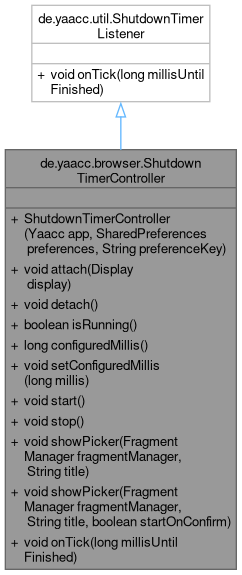
Classes | |
| interface | Display |
| Shows the timer state. More... | |
Public Member Functions | |
| ShutdownTimerController (Yaacc app, SharedPreferences preferences, String preferenceKey) | |
| void | attach (Display display) |
| Starts listening for ticks and shows the current state right away. | |
| void | detach () |
| Stops listening and drops the display. | |
| boolean | isRunning () |
| long | configuredMillis () |
| void | setConfiguredMillis (long millis) |
| Stores the configured duration. | |
| void | start () |
| Starts the timer with the configured duration. | |
| void | stop () |
| Stops the timer. | |
| void | showPicker (FragmentManager fragmentManager, String title) |
| Shows a time picker (hours and minutes) for the configured duration. | |
| void | showPicker (FragmentManager fragmentManager, String title, boolean startOnConfirm) |
| void | onTick (long millisUntilFinished) |
 Public Member Functions inherited from de.yaacc.util.ShutdownTimerListener | |
Detailed Description
Drives the shutdown timer UI (switch, remaining time, duration picker) for whoever shows it.
The timer itself lives in Yaacc; this class keeps the configured duration in the preferences and tells a Display what to show.
The owner calls attach(Display) when its UI starts and detach() when it stops, so the application never keeps a stopped UI as a listener. Main thread only. The controller holds the application, the preferences and the display between attach and detach, never a Context or View of its own.
Constructor & Destructor Documentation
◆ ShutdownTimerController()
| de.yaacc.browser.ShutdownTimerController.ShutdownTimerController | ( | Yaacc | app, |
| SharedPreferences | preferences, | ||
| String | preferenceKey ) |
- Parameters
-
app the application, owner of the timer preferences where the configured duration (millis, a long) is stored preferenceKey the key of the configured duration
Member Function Documentation
◆ configuredMillis()
| long de.yaacc.browser.ShutdownTimerController.configuredMillis | ( | ) |
- Returns
- the configured duration in milliseconds, 0 if none was set
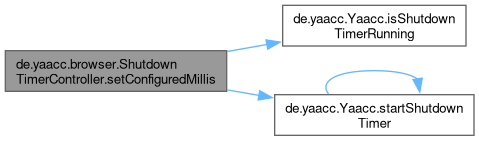
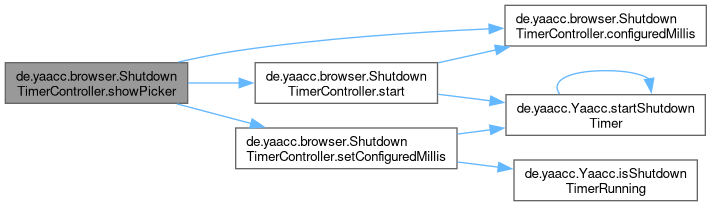
Referenced by de.yaacc.browser.ShutdownTimerController.showPicker(), and de.yaacc.browser.ShutdownTimerController.start().

◆ detach()
| void de.yaacc.browser.ShutdownTimerController.detach | ( | ) |
Stops listening and drops the display.
Safe to call without a previous attach.
◆ onTick()
| void de.yaacc.browser.ShutdownTimerController.onTick | ( | long | millisUntilFinished | ) |
Implements de.yaacc.util.ShutdownTimerListener.
◆ setConfiguredMillis()
| void de.yaacc.browser.ShutdownTimerController.setConfiguredMillis | ( | long | millis | ) |
Stores the configured duration.
A running timer is restarted with it.
Referenced by de.yaacc.browser.ShutdownTimerController.showPicker().

◆ showPicker() [1/2]
| void de.yaacc.browser.ShutdownTimerController.showPicker | ( | FragmentManager | fragmentManager, |
| String | title ) |
Shows a time picker (hours and minutes) for the configured duration.
The new duration is applied when the user confirms.
- Parameters
-
fragmentManager where to show the picker title title of the picker
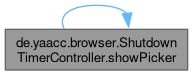
Referenced by de.yaacc.browser.ShutdownTimerController.showPicker().
◆ showPicker() [2/2]
| void de.yaacc.browser.ShutdownTimerController.showPicker | ( | FragmentManager | fragmentManager, |
| String | title, | ||
| boolean | startOnConfirm ) |
- Parameters
-
startOnConfirm start the timer with the chosen time when the user confirms (a duration of 0 only stores it and never starts a timer)
The documentation for this class was generated from the following file:
- /github/workspace/yaacc/src/main/java/de/yaacc/browser/ShutdownTimerController.java
Generated by
 1.12.0