Activity for browsing devices and folders. More...


Public Member Functions | |
| void | onStart () |
| void | onStop () |
| void | onResume () |
| void | startPlayAction (DIDLObject object, int mode, Runnable onStarted, Runnable onComplete) |
Starts a play, play-all or add-to-playlist action (ContentItemPlayTask). | |
| void | onSaveInstanceState (@NonNull Bundle outState) |
| boolean | isAtRoot () |
| void | onClick (View v) |
| void | onCreate (Bundle savedInstanceState) |
| boolean | onBackPressed () |
| Steps 'up' in the folder hierarchy or closes App if on device level. | |
| void | populateItemList (boolean clear) |
| Selects the place in the UI where the items are shown and renders the content directory. | |
| void | showLoading (int position) |
| void | hideLoading (int position) |
| void | deviceAdded (Device<?, ?, ?> device) |
| Refreshes the shown devices when device is added. | |
| void | deviceRemoved (Device<?, ?, ?> device) |
| The shown folder stays when its server leaves the registry (byebye, or expiry after the device slept): the registry often has it back a moment later. | |
| void | deviceUpdated (Device<?, ?, ?> device) |
| void | receiverDeviceRemoved (Device<?, ?, ?> device) |
| void | receiverDeviceAdded (Device<?, ?, ?> device) |
| Navigator | getNavigator () |
| Returns Object containing about the current navigation way. | |
| void | setNavigator (Navigator navigator) |
| View | onCreateView (LayoutInflater inflater, ViewGroup container, Bundle savedInstanceState) |
| void | onViewCreated (View view, Bundle savedInstanceState) |
| void | onDestroyView () |
| void | playItem (DIDLObject item) |
| void | playAllChildsOfParentFrom (DIDLObject item) |
Builds and plays the queue of all playable siblings of item's parent folder, starting at item – e.g. | |
| void | addToPlayList (DIDLObject currentObject) |
 Public Member Functions inherited from de.yaacc.upnp.UpnpClientListener | |
| Public Member Functions inherited from de.yaacc.browser.OnBackPressedListener | |
Static Public Attributes | |
| static final String | CONTENT_LIST_NAVIGATOR = "CONTENT_LIST_NAVIGATOR" |
Protected Attributes | |
| RecyclerView | contentList |
Detailed Description
Activity for browsing devices and folders.
Represents the entrypoint for the whole application.
Member Function Documentation
◆ deviceAdded()
| void de.yaacc.browser.ContentListFragment.deviceAdded | ( | Device<?, ?, ?> | device | ) |
Refreshes the shown devices when device is added.
Implements de.yaacc.upnp.UpnpClientListener.
◆ deviceRemoved()
| void de.yaacc.browser.ContentListFragment.deviceRemoved | ( | Device<?, ?, ?> | device | ) |
The shown folder stays when its server leaves the registry (byebye, or expiry after the device slept): the registry often has it back a moment later.
The folder is only cleared when the user navigates away or selects another server (onResume()).
Implements de.yaacc.upnp.UpnpClientListener.
◆ deviceUpdated()
| void de.yaacc.browser.ContentListFragment.deviceUpdated | ( | Device<?, ?, ?> | device | ) |
Implements de.yaacc.upnp.UpnpClientListener.
◆ getNavigator()
| Navigator de.yaacc.browser.ContentListFragment.getNavigator | ( | ) |
Returns Object containing about the current navigation way.
- Returns
- information about current navigation
◆ isAtRoot()
| boolean de.yaacc.browser.ContentListFragment.isAtRoot | ( | ) |
- Returns
- true if the shown folder is the root of the server, or if nothing is loaded yet. Read-only and null-safe, for hosts that decide what back does (the return value of
onBackPressed()cannot tell: it is always true).

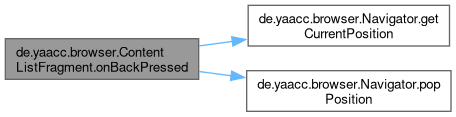
◆ onBackPressed()
| boolean de.yaacc.browser.ContentListFragment.onBackPressed | ( | ) |
Steps 'up' in the folder hierarchy or closes App if on device level.
Implements de.yaacc.browser.OnBackPressedListener.
◆ playAllChildsOfParentFrom()
| void de.yaacc.browser.ContentListFragment.playAllChildsOfParentFrom | ( | DIDLObject | item | ) |
Builds and plays the queue of all playable siblings of item's parent folder, starting at item – e.g.
tapping an audio item row, or a row's "play all" button.
Prefers the BrowseContentItemAdapter's own current, already client-side-sorted list of loaded children (the exact list the user sees and tapped from) over re-browsing the server, so the resulting playback order matches the active sort mode/direction instead of the server's unsorted default order (see issue play-all-ignores-sort-order). Falls back to the old server re-browse only when the adapter can't provide that view: no adapter,
item
item

◆ receiverDeviceAdded()
| void de.yaacc.browser.ContentListFragment.receiverDeviceAdded | ( | Device<?, ?, ?> | device | ) |
Implements de.yaacc.upnp.UpnpClientListener.
◆ receiverDeviceRemoved()
| void de.yaacc.browser.ContentListFragment.receiverDeviceRemoved | ( | Device<?, ?, ?> | device | ) |
Implements de.yaacc.upnp.UpnpClientListener.
◆ startPlayAction()
| void de.yaacc.browser.ContentListFragment.startPlayAction | ( | DIDLObject | object, |
| int | mode, | ||
| Runnable | onStarted, | ||
| Runnable | onComplete ) |
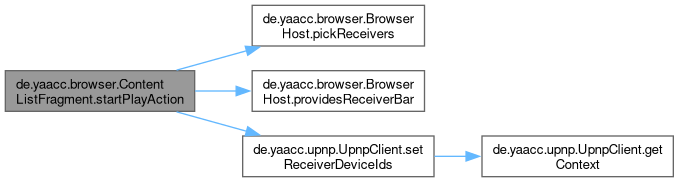
Starts a play, play-all or add-to-playlist action (ContentItemPlayTask).
New layout (the host owns the receiver bar): the receivers are picked per action. The host's "Play on..." sheet opens first; cancelling leaves everything as it was. Confirming stores the chosen receivers (UpnpClient#setReceiverDeviceIds), then starts the task, and the selection is cleared again once the players have been started (play(List) and addToPlayList). Only one picked action may be starting at a time (the selection is global): a request while a pick is open or another action is still starting is dropped, with a short message.
Classic (no host, or a host without the receiver bar): the task starts at once with the tab-based selection, exactly as before, and nothing is cleared.
- Parameters
-
mode ContentItemPlayTask#PLAY_CURRENT,ContentItemPlayTask#PLAY_ALLorContentItemPlayTask#ADD_TO_PLAYLISTonStarted runs on the main thread right before the task starts (progress, a toast), may be null onComplete runs on the main thread when the task is done, may be null
The documentation for this class was generated from the following file:
- /github/workspace/yaacc/src/main/java/de/yaacc/browser/ContentListFragment.java
Generated by
 1.12.0